

iCloud Shared Photo Library Support Added in Latest iOS 16 and macOS Ventura Betas - MacRumorsOpen MenuShow RoundupsShow Forums menuVisit ForumsOpen Sidebar
Skip to Content

iCloud Shared Photo Library Support Added in Latest iOS 16 and macOS Ventura Betas

With the third betas of iOS 16, iPadOS 16, and macOS Ventura that went out to developers this morning, Apple has added support for iCloud Shared Photo Library, a new feature that was not in the initial betas.
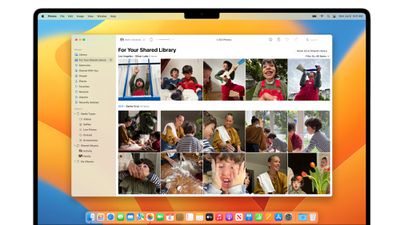
icloud shared photo library
‌iCloud‌ Shared Photo Library is designed to make it easier for you to share photos with your family members, and after installing iOS 16, iPadOS 16, or macOS Ventura, it can be set up in the Settings app. Under Photos, scroll down to "Shared Library" and tap it.

From there, tap on "Start Setup" to add participants you want to share with. You can invite up to five other people, and all participants can add, edit, or delete content from the shared library. You can add any five people, including people who you do not have a Family Sharing setup with.
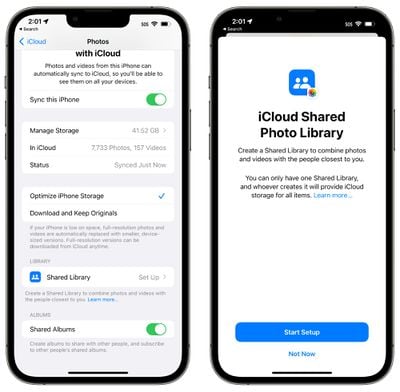
shared photo library splash screen
After selecting people to share with, you can opt to move your photos to the Shared Library. You can move all your photos and videos, photos that include select people or that are from a select date, or you can choose photos manually.

Once your photos are added, you can preview the library before it's shared, and then officially invite participants using the Messages app or a shared link. All participants will have access to all photos that are uploaded to the shared library.
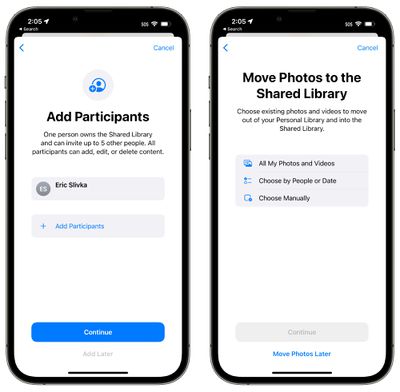
shared library add participants
To prevent accidentally shared photos, there are smart setup rules that can be implemented. You can opt to share all past photos or just photos from a specific start date. You can also choose to share photos that have only specific people, such as your family members.
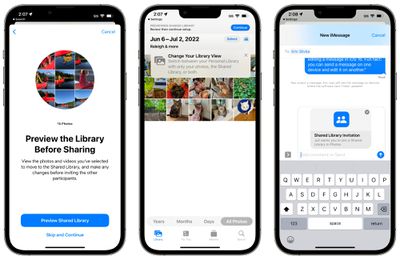
shared photo library 1
‌Photos‌ can be added to the Shared Library automatically, but there are also options to share based on Bluetooth proximity. Sharing suggestions will continue to pop up in For You as well.

With a new toggle in the Camera app you can upload all photos you take to the Shared Library automatically, so if you're out on vacation with your family, everyone can see vacation photos as soon as they're snapped.

Shared photos will show up in Memories, Featured ‌‌Photos‌‌, and the ‌‌Photos‌‌ widget, similar to standard ‌‌iCloud‌‌ Library images.

Related Forums: iOS 16, macOS Ventura

Popular Stories

Four iPhone 18 Pro Colors Mock Feature

iPhone 18 Pro and iPhone Ultra: Pre-Orders and Release Date

Thursday July 30, 2026 6:12 am PDT by
Apple has yet to reveal when the iPhone 18 Pro and iPhone Ultra will be announced and released, but the dates usually follow a familiar pattern. Labor Day is September 7 this year. The last time the holiday fell on that day was in 2020, but the iPhone event that year was delayed until October due to the COVID-19 pandemic. So, the last time Labor Day was on September 7 in a normal year was in ...
Apple Event Logo

Apple Working on All-New Operating System

Wednesday July 29, 2026 11:39 am PDT by
Apple is developing an all-new operating system that is essentially a mix of tvOS, watchOS, and iOS, according to Bloomberg's Mark Gurman. In a report this week, he said the operating system will feature a grid of icons, widgets, and apps, along with customizable clock faces. The new software platform is intended for Apple's long-rumored smart home hub. With built-in facial recognition,...

Dynamic Island iPhone 18 Pro Feature

iPhone 18 Pro: Twelve Changes Coming to Apple's Next Flagship

Thursday July 30, 2026 3:43 am PDT by
We're less than two months out from the launch of Apple's premium next-generation smartphone lineup, and while we're not expecting a dramatic change in terms of functionality, there are still several enhancements rumored to be coming to the iPhone 18 Pro and iPhone 18 Pro Max. One thing worth noting is that Apple is reportedly planning a major change to its iPhone release cycle this year,...

Top Rated Comments

LtRoyalShrimp Avatar
53 months ago
Families today are often more than 5 people if generations are included and some of us, unfortunately, have to deal with divorced families. At first glance, the limit of one library seems bad but it seems like we can only start one shared library, yet be a part of more than one if someone else invites us?


I don't see the benefit over shared albums?
Shared Albums have awful limits like: No photo information and reduced quality.


When shared, photos are reduced to 2048 pixels on the long edge, except panoramic photos, which can be up to 5400 pixels wide. You can share GIFs that are 100MB or smaller.

Videos can be up to fifteen minutes in length and are delivered at up to 720p resolution.
https://support.apple.com/en-us/HT202786

From what I understand Shared Library has 100% the same information for everyone at the highest quality with all metadata.
Score: 11 Votes (Like | Disagree)
53 months ago
This is good but the natural next step is needing multiple. One for the parents. One for kids. One for friend groups.

Shared albums are clunky and inconsistent. This is hopefully a better solution they can scale over the next 2-3 years.
Score: 10 Votes (Like | Disagree)
Grimace Avatar
53 months ago
The words "Move Photos" are throwing me off a little. If we are truly moving them to this album, and everyone has Read/Write/Delete access, couldn't your annoying sister delete your photo?

Or, should it read "Copy Photos" to the Shared Album?
Score: 6 Votes (Like | Disagree)
53 months ago
This is WAY WAY WAY more advanced than current Shared Albums, which are entirely and completely manual. you literally have to move photos that way by selecting photos one-at-a-time.

You can set the family share to automatically send ALL photos you take to the family album, or just those with family members identified in the pic, or just those at certain locations and have it done completely automatically. There is no step 2 after taking the photo! I also really like the toggle right inside the camera app so you can PRE-EMPTIVELY decide if the photos you are about to take go to your personal album or the family album.

If it works as expected, this will be a major improvement for families.
Score: 6 Votes (Like | Disagree)
53 months ago
How is this different for the current Shared Albums?

Lol limiting to six people though. I guess larger families can’t have this?!?
Score: 5 Votes (Like | Disagree)
squirrelist Avatar
53 months ago

How is this different for the current Shared Albums?

Lol limiting to six people though. I guess larger families can’t have this?!?

I don't see the benefit over shared albums?
Current Shared Albums are much clunkier. You have to remember to copy items in, they are reduced quality, they can’t be edited, and they can’t be selected in the photo picker. This new album allows you to easily move photos between, not a copy, and they act as if they are pics in your own real photo library, and you can easily see which items are only in your personal library but not yet shared to the shared one.
Score: 4 Votes (Like | Disagree)

🔗 Related Apple News & Rumors

Stay updated with the latest Apple ecosystem news and verified rumors









































