

More iOS 16 Tidbits: New FaceTime Video Call UI, Redesigned Video Player, and More - MacRumorsOpen MenuShow RoundupsShow Forums menuVisit ForumsOpen Sidebar
Skip to Content

More iOS 16 Tidbits: New FaceTime Video Call UI, Redesigned Video Player, and More

Apple this week announced iOS 16, a major release filled with significant customization features for the Lock Screen, new features for Focus mode, the ability to edit and retract iMessages, and so much more.
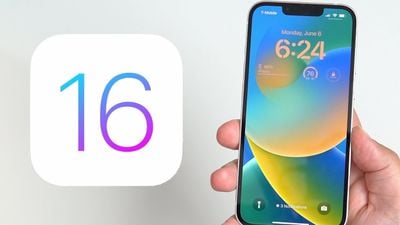
ios 16 lock screen
While Apple showcased some of iOS 16's major features during its jam-packed WWDC keynote, there are dozens, if not hundreds, of smaller features and changes left for users to discover. Below, we've compiled a list of six changes and new features you may not have known about.

Transparent FaceTime Video Call UI
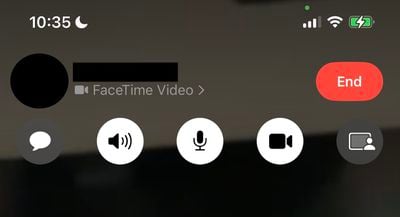
ios 16 transparent video call ui
During a FaceTime video call, Apple has updated the UI in iOS 16 to be fully transparent, with buttons for camera, microphone, message, speaker, and SharePlay now larger and easier to tap.

iMessage Mention Suggestions Now Include Contact Images

ios 16 imessage mentions
When mentioning a contact on iMessage, mention suggestions now include a contact image in the Quick Tap bar. This can be particularly helpful in group chats where multiple people may share a first name.

Entirely Redesigned Video Player UI
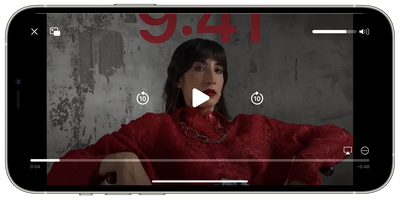
ios 16 updated vidoe player ui
Apple has redesigned the stock video player UI in iOS 16, making it cleaner by getting rid of unnecessary clutter while highlighting basic controls such as volume, play/pause, and Picture in Picture.

Redesigned Voice Messaging Experience in iMessage
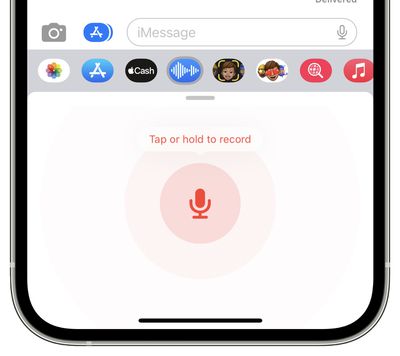
ios 16 new audio recording imessage
Apple has redesigned the voice messaging experience on iMessage with iOS 16, making it its own separate iMessage app that lives in the app bar.

The app lets users tap, hold, and record messages more quickly. Apple has replaced the previous hold and swipe-up gesture to record voice messages with a new Dictation button. On a related note, users can now skim through voice messages on iOS 16.

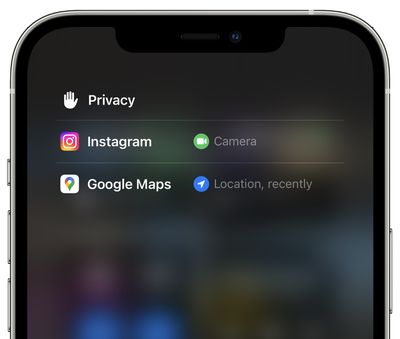
Privacy Access History
ios 16 privacy access history
On iOS 16 Apple is adding a neat trick that lets users check which apps have recently accessed their camera, microphone, location, and other sensitive sensors on their iPhone. The new view can be accessed by tapping on the top of Control Center shortly after an app has used access.


Related Forum: iOS 16

Popular Stories

iOS 27 Next to iPhone

Here's When iOS 27 Rolls Out Today in Every Time Zone [Update: It's Out]

Sunday September 13, 2026 3:00 am PDT by
Update 10:04 a.m.: iOS 27 is rolling out now, though it may take a bit for all users to see it, so keep checking! Apple is about to release iOS 27, which will finally deliver more advanced Siri AI capabilities as well as a variety of other refinements, improvements, and new features to iPhones. It's Apple's biggest software update of the year, and Apple announced at Wednesday's iPhone event...


iOS 27 Icon iPhone

iOS 27 Available Today With These 8 New Features

Monday September 14, 2026 9:00 am PDT by
Update: Apple has released iOS 27. During its iPhone 18 Pro and iPhone Duo event last week, Apple announced that iOS 27 will be released widely on Monday, September 14. iOS 27 should be available around 10 a.m. Pacific Time / 1 p.m. Eastern Time today via the Settings app, under General → Software Update. Below, we have highlighted eight new features and changes coming with iOS...
deep black iphone 18 pro

Apple Says iPhone 18 Pro Max Sold in U.S. Differs in One Way

Saturday September 12, 2026 3:27 pm PDT by
As noted by Nicolas Lellouche, who writes for the French tech website Numerama, Apple has updated its tech specs pages for the iPhone 18 Pro and iPhone 18 Pro Max to clarify which models are equipped with its new C2 cellular modem and where. Apple now says the iPhone 18 Pro has a C2 modem worldwide, while the iPhone 18 Pro Max uses the chip in every country except for the U.S. According...

Top Rated Comments

a104375 Avatar
56 months ago
I hate that the new video controls dim the screen and are needlessly in the middle. What was wrong with having them off to the side out of the main content area?
Score: 6 Votes (Like | Disagree)
Reeneman Avatar
56 months ago
These are some very welcome small features :)
Score: 5 Votes (Like | Disagree)
Kylo83 Avatar
56 months ago

These are some very welcome small features :)
None will really change anything, we need the batt % number back at the top and the home bar gone that would make a big change
Score: 3 Votes (Like | Disagree)
56 months ago
Privacy access history is great. Also transparent FaceTime UI during video calls is nice.
Score: 2 Votes (Like | Disagree)
56 months ago

I hate that the new video controls dim the screen and are needlessly in the middle. What was wrong with having them off to the side out of the main content area?
I thought I was the only one! The new video controls would be fine if they didn’t have to dim the entire video to change volume or scrub video track..
Score: 1 Votes (Like | Disagree)
chibihabibi Avatar
56 months ago
The transparent elements for FaceTime and the video player look very amateurish to me. I’ve always loved the translucent elements, why do they need to change things just for the sake of it?
Score: 1 Votes (Like | Disagree)

🔗 Related Apple News & Rumors

Stay updated with the latest Apple ecosystem news and verified rumors









































