

iMovie and Clips Apps for iOS Gain Support for iPhone 13 Features - MacRumorsOpen MenuShow RoundupsShow Forums menuVisit ForumsOpen Sidebar
Skip to Content

iMovie and Clips Apps for iOS Gain Support for iPhone 13 Features

Apple today updated iMovie and Clips with support for several new features that are set to be introduced alongside the iPhone 13 models.
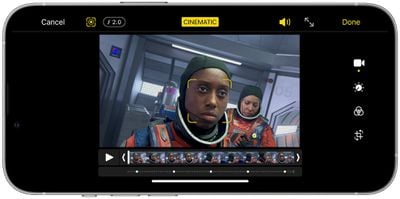
iphone 12 pro cinematic mode

iMovie now supports Cinematic Mode and can be used to add, adjust, and delete focus points and modify the depth of field effect in Cinematic Mode video. Cinematic Mode is a feature that's available on all of the iPhone 13 models, but footage can be edited on the iPhone XS or later, iPad mini 5 or later iPad Air 3 or later, and all iPad Pro models.

The update also includes the option to add ProRAW images to movies and trailers, and options to import and edit ProRes video.

ProRes video is a feature coming to the iPhone 13 Pro models later this year, and it will allow the devices to record in the ProRes format. ProRes video can be captured with an iPhone 13 Pro when the feature launches and it will be able to be edited on the iPhone 13, ‌iPad mini‌ 6, and ‌iPad Pro‌ models.

As for Clips, Cinematic Mode video can now be imported and edited in the app. Filters, stickers, and emoji can be added to video recorded in Cinematic Mode, and ProRAW images can be added to videos. When ProRes video launches, it will also be able to be imported into Clips and edited directly in the app.

Today's update also adds the option to add photos or videos from the Photos library with a single tap, without having to record each one into a project.

iMovie and Clips can both be downloaded from the App Store for free.

Popular Stories

Apple Event Logo

Apple Working on All-New Operating System

Wednesday July 29, 2026 11:39 am PDT by
Apple is developing an all-new operating system that is essentially a mix of tvOS, watchOS, and iOS, according to Bloomberg's Mark Gurman. In a report this week, he said the operating system will feature a grid of icons, widgets, and apps, along with customizable clock faces. The new software platform is intended for Apple's long-rumored smart home hub. With built-in facial recognition,...
imac video apple feature

Apple Made Its Second-Biggest Acquisition Ever This Year

Wednesday July 29, 2026 12:03 pm PDT by
Apple this year acquired Israeli startup Q.ai for close to $2 billion, according to the Financial Times. That would make this Apple's second-biggest acquisition ever, after it paid $3 billion for the popular headphone maker Beats in 2014. This is also the largest known Apple acquisition since the company purchased Intel's smartphone modem business and patents for $1 billion in 2019. Q.ai...
Dynamic Island iPhone 18 Pro Feature

iPhone 18 Pro: Twelve Changes Coming to Apple's Next Flagship

Thursday July 30, 2026 3:43 am PDT by
We're less than two months out from the launch of Apple's premium next-generation smartphone lineup, and while we're not expecting a dramatic change in terms of functionality, there are still several enhancements rumored to be coming to the iPhone 18 Pro and iPhone 18 Pro Max. One thing worth noting is that Apple is reportedly planning a major change to its iPhone release cycle this year,...

Top Rated Comments

64 months ago
Slow-Mo video shot on iPhone doesn't transfer it seems to Final Cut Pro...it could be user error but I think that's how it is as I've shot slow-mo and all I end up getting is a 1080P video that is at normal speed when honestly my workflow is 4K anyway...not a big deal just something I noticed.

...so with that said, I saw that we can adjust focus points later after shooting a video in Cinematic Mode (GREAT!) but same question applies. Will Final Cut Pro be updated to adjust this later or do I have to adjust on iPhone then export the video from iCloud photos?

As what Apple calls a "pro user" I"m hoping they don't expect me to edit these in iMovie for iPhone to retain the feature. Forcing me to use the feature on a tiny screen when I Have an iMac with 50 inches of screen real estate doesn't feel "oh.so.pro"

Score: 4 Votes (Like | Disagree)
Johnny907 Avatar
64 months ago
Lol “clips.”
Apple continues to delude itself into thinking anyone uses that app.

Score: 2 Votes (Like | Disagree)
FCX Avatar
63 months ago

...so with that said, I saw that we can adjust focus points later after shooting a video in Cinematic Mode (GREAT!) but same question applies. Will Final Cut Pro be updated to adjust this later or do I have to adjust on iPhone then export the video from iCloud photos?
Update coming, not sure when:
https://fcp.co/final-cut-pro/articles/2514-refocus-iphone-13-pro-movies-in-final-cut-pro-and-imovie
Score: 1 Votes (Like | Disagree)
ccraig13 Avatar
64 months ago

Slow-Mo video shot on iPhone doesn't transfer it seems to Final Cut Pro...it could be user error but I think that's how it is as I've shot slow-mo and all I end up getting is a 1080P video that is at normal speed when honestly my workflow is 4K anyway...not a big deal just something I noticed.

...so with that said, I saw that we can adjust focus points later after shooting a video in Cinematic Mode (GREAT!) but same question applies. Will Final Cut Pro be updated to adjust this later or do I have to adjust on iPhone then export the video from iCloud photos?

As what Apple calls a "pro user" I"m hoping they don't expect me to edit these in iMovie for iPhone to retain the feature. Forcing me to use the feature on a tiny screen when I Have an iMac with 50 inches of screen real estate doesn't feel "oh.so.pro"
When I AirDrop a video shot in 240fps from my iPhone 8, it converts it to a 30fps file, but all the frames are there so the video is slowed down when I view it in FCP 10.5.4. Then you can speed it up if desired with the retiming tool and still have all those frames. I also make sure I change the slow-mo in and out points for the file on the iPhone before AirDropping to make sure the whole file is slow. Is that not happening or you?
Score: 1 Votes (Like | Disagree)
19callum93 Avatar
64 months ago
I wish iMovie on iOS would support portrait video 😩
Score: 1 Votes (Like | Disagree)
FSMBP Avatar
64 months ago
Their Clips app is so under rated. Such a hassle free app.
Score: 1 Votes (Like | Disagree)

🔗 Related Apple News & Rumors

Stay updated with the latest Apple ecosystem news and verified rumors










































