

Apple's Shazam Control Center Music Recognition Feature Hits 1 Billion Songs Identified - MacRumorsOpen MenuShow RoundupsShow Forums menuVisit ForumsOpen Sidebar
Skip to Content

Apple's Shazam Control Center Music Recognition Feature Hits 1 Billion Songs Identified

With the launch of iOS 14.2, Apple introduced a new Shazam Music Recognition toggle for the Control Center, giving iPhone, iPad, and iPod touch users a quick and easy way to identify what music is playing.
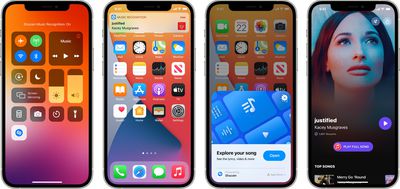
shazam music recognition
Music Recognition has been a popular Control Center integration, and according to Apple, Shazam just surpassed 1 billion cumulative recognitions from the Control Center on iOS devices.

Compared to the standard Shazam app, Music Recognition is unique because it allows users to identify songs playing in their favorite apps, TV shows, and movies even while wearing headphones, a feature available in addition to the option to identify songs playing out loud.

The number one most Shazamed track from the Control Center is Bruno Mars' "Talking to the Moon," with a list of the top 10 Shazamed songs available below.

  • "Talking To The Moon" - Bruno Mars
  • "Astronaut In The Ocean" - Masked Wolf
  • "MONTERO (Call Me By Your Name)" - Lil Nas X
  • "Beggin" - Måneskin
  • "Another Love" - Tom Odell
  • "Runaway" - AURORA
  • "Dick" - StarBoi3 Feat. Doja Cat
  • "Arcade" - Duncan Laurence
  • "Stay" - The Kid LAROI & Justin Bieber
  • "drivers license" - Olivia Rodrigo

For those who do not already use Music Recognition, it can be added to the Control Center by opening up the Settings app and selecting the Control Center section. From there, scroll down and tap the "+" button next to the "Music Recognition" option that has the Shazam logo. Once added, users can access the Control Center and tap on the icon with the Shazam logo to identify a song that's playing.

Apple is improving Music Recognition in iOS 15 and going forward, it will automatically save a list of songs that users have discovered through the Control Center feature. The Music Recognition history can be viewed by long pressing on the Shazam Control Center icon on a device running iOS 15 or iPadOS 15.

Developers are also now able to take advantage of a ShazamKit API that allows Shazam's audio recognition technology to be integrated directly into apps, and the first apps with this functionality will launch this fall.


Tag: Shazam

Popular Stories

Shazam Updated With iMessage Stickers is locked Joe Rossignol is currently editing Shazam Updated With iMessage Stickers Feature

Shazam Updated With iMessage Stickers Inspired by Ariana Grande's New Album

Friday July 31, 2026 6:15 am PDT by
Apple today updated the Shazam app with stickers, starting with an exclusive collection inspired by Ariana Grande's new "petal" album. To send stickers in the Messages app, tap the plus sign in a conversation, select Stickers, tap on the Shazam app icon, and tap on a sticker. You can also send stickers in FaceTime and in other apps where the emoji keyboard is available. Make sure to...

Apple Event Logo

Apple Working on All-New Operating System

Wednesday July 29, 2026 11:39 am PDT by
Apple is developing an all-new operating system that is essentially a mix of tvOS, watchOS, and iOS, according to Bloomberg's Mark Gurman. In a report this week, he said the operating system will feature a grid of icons, widgets, and apps, along with customizable clock faces. The new software platform is intended for Apple's long-rumored smart home hub. With built-in facial recognition,...
imac video apple feature

Apple Made Its Second-Biggest Acquisition Ever This Year

Wednesday July 29, 2026 12:03 pm PDT by
Apple this year acquired Israeli startup Q.ai for close to $2 billion, according to the Financial Times. That would make this Apple's second-biggest acquisition ever, after it paid $3 billion for the popular headphone maker Beats in 2014. This is also the largest known Apple acquisition since the company purchased Intel's smartphone modem business and patents for $1 billion in 2019. Q.ai...

Top Rated Comments

64 months ago

Funny thing, I do have Shazam icon on my control center, and for some reason, when I need to quickly identify a song, I go to spotlight, search for the Shazam app, and launch the app. I completely ignore that Control Center button.
I removed my control center button, because it has no link to the app. It keeps no history and doesn’t save to a playlist.
Score: 3 Votes (Like | Disagree)
Populus Avatar
64 months ago
Funny thing, I do have Shazam icon on my control center, and for some reason, when I need to quickly identify a song, I go to spotlight, search for the Shazam app, and launch the app. I completely ignore that Control Center button.
Score: 3 Votes (Like | Disagree)
64 months ago

I don't like you can’t try again later when their music database is updated like sound hound. Also I do a control center Shazam and later open the Shazam app and it has no history and I lost what I was searching for.
Thankfully iOS 15 fixes this. If you Haptic Touch on the icon on iOS 15, it opens a history of identified songs. I am on the beta currently and I have 20 songs identified in history so far.
Score: 3 Votes (Like | Disagree)
JosephAW Avatar
64 months ago
I don't like you can’t try again later when their music database is updated like sound hound. Also I do a control center Shazam and later open the Shazam app and it has no history and I lost what I was searching for.
Score: 3 Votes (Like | Disagree)
64 months ago
Use this quite often. Shazam is fantastic.
Score: 2 Votes (Like | Disagree)
64 months ago

This inability to see search history makes the app as it currently stands worthless. I'm not going to go searching for songs AFTER the app has recognized it while in a social setting. If I don't do it then and there, the identification is lost. It's so dumb. Nice that the entire phone needs an update for this to function as well as it's acquired app from 10 years ago.
Shazam is great, hardly "worthless". all my shazams are in a history, just scroll through them in the order you shammed. Seriously, this complaint of yours is confusing. Sorry it is too complicated for you. Maybe there is another app that works better for you
Score: 2 Votes (Like | Disagree)

🔗 Related Apple News & Rumors

Stay updated with the latest Apple ecosystem news and verified rumors










































