

Microsoft Edge 89 Brings Vertical Tabs and New History View - MacRumorsOpen MenuShow RoundupsShow Forums menuVisit ForumsOpen Sidebar
Skip to Content

Microsoft Edge 89 Brings Vertical Tabs and New History View

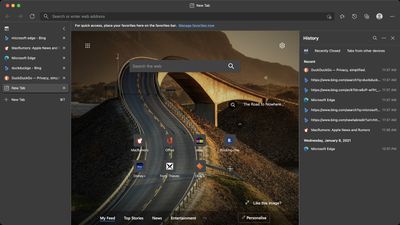
Microsoft has officially released version 89 of its popular Chromium-based Edge browser, bringing its long-trialed vertical tabs feature to Mac for the first time.
microsoft edge vertical tabs
Vertical tabs are intended to make more efficient use of screen space, and should prove a welcome addition for users browsing on 16:9 ratio displays in particular. Users can click vertical tabs to switch between them and optionally group related tabs together.

"To make tab management and organization easier, vertical tabs is now generally available this month," said Microsoft corporate VP Liat Ben-Zur in a company blog post. "Now everyone can view and manage their tabs from a pane on the side with a single click. This allows you to clearly see the tab titles and controls, making it easier to find and switch between the tabs you need, regardless of how many you have open."

Edge users can toggle between horizontal and vertical tabs by clicking the new "Turn on/off vertical tabs" icon at the far left of the tab row. By default, vertical tabs are displayed as icons unless hovered over with the mouse pointer, but the expanded pane can also be pinned to the left side of the browser window so that each page's title remains visible.

In addition to vertical tabs, Edge now includes a new way to view browsing history. Now when users go to history, it opens as a lightweight dropdown from the toolbar instead of opening the full page view in settings. The idea is that it allows users to easily search, open and manage their history without navigating away. For users who prefer the original style, this drop-down can also be pinned to the right side of the browser window as a pane.

Microsoft Edge has won over many users with its frequent feature updates and the tight integration of Microsoft's design language with the design signature of macOS. The last major update came in January and introduced several new features, including system resource-releasing "sleeping tabs," a password generator and monitor, new visual themes, and more.

The browser can be downloaded from the Microsoft Edge website.

Popular Stories

Apple Event Logo

Apple Working on All-New Operating System

Wednesday July 29, 2026 11:39 am PDT by
Apple is developing an all-new operating system that is essentially a mix of tvOS, watchOS, and iOS, according to Bloomberg's Mark Gurman. In a report this week, he said the operating system will feature a grid of icons, widgets, and apps, along with customizable clock faces. The new software platform is intended for Apple's long-rumored smart home hub. With built-in facial recognition,...
imac video apple feature

Apple Made Its Second-Biggest Acquisition Ever This Year

Wednesday July 29, 2026 12:03 pm PDT by
Apple this year acquired Israeli startup Q.ai for close to $2 billion, according to the Financial Times. That would make this Apple's second-biggest acquisition ever, after it paid $3 billion for the popular headphone maker Beats in 2014. This is also the largest known Apple acquisition since the company purchased Intel's smartphone modem business and patents for $1 billion in 2019. Q.ai...
Dynamic Island iPhone 18 Pro Feature

iPhone 18 Pro: Twelve Changes Coming to Apple's Next Flagship

Thursday July 30, 2026 3:43 am PDT by
We're less than two months out from the launch of Apple's premium next-generation smartphone lineup, and while we're not expecting a dramatic change in terms of functionality, there are still several enhancements rumored to be coming to the iPhone 18 Pro and iPhone 18 Pro Max. One thing worth noting is that Apple is reportedly planning a major change to its iPhone release cycle this year,...

Top Rated Comments

Chompineer Avatar
71 months ago

Huh. Vertical tabs should be interesting.

I have an Ultrawide (16:9) monitor, and I don't need the entire horizontal space for the browser.

Granted, I do run other programs and have no problem using all of the monitor space, but having other options for how I can organize my browser pages/tabs would be nice.

I mostly use Safari, but I will check this out at some point in time.
Ultrawide is 21:9.


“Popular“??

Or installed on every windows 10 machine and used to download Chrome or Firefox....

I don’t think I’ve ever seen it on a MacOS Machine.
Sounds like you’re stuck in the past. The chromium based edge is better than Chrome, and very light in resources. I exclusively use it on my Mac, Safari has too many compatibility issues and doesn’t sync with my windows PC.
Score: 23 Votes (Like | Disagree)
71 months ago
Edge on MacOS is an excellent browser. I rarely use Chrome anymore. Edge is lighter (as in uses fewer resources) and works with everything - including my work stuff which Safari doesn't.
Score: 20 Votes (Like | Disagree)
Prabas Avatar
71 months ago

Didn't know Microsoft had a browser for the Mac... I use Safari or Chrome. Not familiar with Edge. Any good?
Almost the same as Chrome but not Google. You can import everything from Chrome to Edge. Some say it's faster and more energy efficient than Chrome. I completely replaced Chrome with Edge and I don't think that I'm missing anything.
Score: 19 Votes (Like | Disagree)
PBG4 Dude Avatar
71 months ago

It is a good way to make room for all those ribbon-nested free shopping and news plugins.
Definitely, and I could always use more space for those

Attachment Image
Score: 12 Votes (Like | Disagree)
71 months ago

Why?
- Can Edge also synch all bookmarks on all devices (macOS and iOS?)
- Does it block ads as effectively (plug-in) and secure (native script analysis) as Safari?
- After deleting the application, does it leave as much data junk and support data as Chrome, for example?
- It it a MS$ gift without ulterior motives?
- Is it optimized for speed (new Apple CPU)?

These are the thoughts you have when you live under a rock ;-)
It literally does all these things. At least do some basic research before trying to bash something you clearly know nothing about.
Score: 11 Votes (Like | Disagree)
71 months ago

I see that you are a big fan of Edge.
Can you explain to me why Microsoft avoids putting its browsers on the Apple App Store for download?
Are they afraid of Apple's in-depth security review?

I would actually try the browser if I knew that it could be deleted cleanly afterwards. This has not been the case with any Microsoft software so far (anyone who has looked into it knows that).
Is Firefox in the Apple App Store? is Chrome in the Apple App Store? Is Brave in the Apple App Store? Is Opera in the Apple App Store? What browsers ARE in the Apple App Store? Maxthon maybe?
Score: 9 Votes (Like | Disagree)

🔗 Related Apple News & Rumors

Stay updated with the latest Apple ecosystem news and verified rumors











































