Brydge Brings Multi-Touch Support to Pro+ Keyboards, Debuts New 10.2-Inch Max+ Model - MacRumorsOpen MenuShow RoundupsShow Forums menuVisit ForumsOpen Sidebar
Skip to Content

Brydge Brings Multi-Touch Support to Pro+ Keyboards, Debuts New 10.2-Inch Max+ Model

Brydge today announced the upcoming launch of a new beta firmware update designed for the Pro+ keyboards, which launched last spring. The Pro+ keyboards feature integrated trackpads and came out ahead of when Apple added dedicated trackpad support to iPadOS.
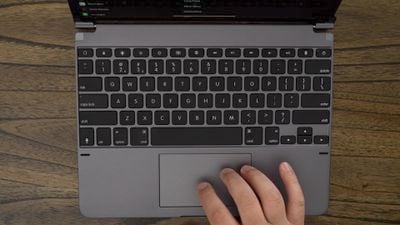
brydgeprotopdownkeyboard
The software available from Brydge adds native multi-touch capabilities and should much improve the trackpad experience of the Pro+ keyboard. We reviewed the keyboard back in March and found the trackpad to be inferior as it wasn't initially designed with Apple's integrations in mind.

According to Brydge, the firmware will bring a "natural" multi-touch experience, with the update available through the Brydge Connect app. Using the new beta firmware requires customers to have the iPadOS 14.5 update installed.

Brydge Pro+ keyboard users who want to try out the new firmware update can sign up on the Brydge website. The first 500 who sign up for the public beta will be able to access the firmware on February 24, while others will get access on March 3. For a limited time, Brydge is also offering up to 25% off on Pro+ keyboards.

Brydge today also announced the launch of the 10.2 MAX+ wireless keyboard case with trackpad, which is designed to work with the 7th and 8th-generation iPad models.

brydge max 10 2 keyboard
Priced at $130, the 10.2 MAX+ has a built-in native multi-touch trackpad and an integrated backlit keyboard, plus it offers full device protection. Brydge says that it is designed to combine the functionality of a Brydge keyboard with the protection of OtterBox. The 10.2 MAX+ can be pre-ordered from the Brydge website.


Tag: Brydge

Popular Stories

iPhone Duo Display Cracking

Apple Alerts Stores to iPhone Duo's Display Cracking Issue

Friday October 30, 2026 3:20 pm PDT by
In a memo shared with Apple Stores and Apple Authorized Service Providers this week, and later obtained by MacRumors, Apple provided technicians with guidance on how to diagnose and address the iPhone Duo's inner display cracking issue. If a customer reports the issue, Apple advised technicians to inspect the iPhone Duo and repair or replace it in accordance with their standard procedures....


iPad mini OLED feature 1

Apple Executive Comments on New iPad Mini Lacking 120Hz Display

Thursday October 29, 2026 1:47 pm PDT by
While the new iPad mini has an OLED display, the device does not support ProMotion, meaning the display's refresh rate is limited to 60Hz instead of 120Hz. ProMotion support would have allowed for the iPad mini's refresh rate to automatically adjust from 10Hz to 120Hz depending on the content being displayed, but evidently Apple has kept the feature exclusive to the iPad Pro among iPad...
Pinched iPad Mini

Apple Avoids Showing Pinched Fingers on iPad Mini Page in South Korea

Thursday October 29, 2026 11:52 am PDT by
In the U.S. and most other countries, Apple's website shows the new iPad mini being held by pinched fingers, but this is not the case in South Korea. The new iPad mini shown with pinched fingers on Apple's website in the U.S. On its South Korean website, Apple simply shows an image of the iPad mini on its own. The new iPad mini shown without pinched fingers on Apple's website in South Korea ...

Top Rated Comments

Apple_Robert Avatar
75 months ago
That keyboard appears to add a lot of bulk to the iPad. If one doesn't really need to be portable, that may not be an issue. I like my Magic Keyboard profile better, even though it is a lot more expensive.
Score: 4 Votes (Like | Disagree)
74 months ago

That's great for existing customers, but surely the Magic Keyboard has killed the product? I'm surprised its taken this long to get the update to be honest as I remember us chatting about this when the Magic Keyboard was first announced.
Price. Also extremely useful function keys. It’s a great alternative.
Score: 3 Votes (Like | Disagree)
75 months ago
Touch screen with handwriting/drawing support... yes there is a reason....
Score: 3 Votes (Like | Disagree)
74 months ago
I bought the iPad magic keyboard during the recent $200 sale, and I've had it for almost a month now. Not sure why the Magic Keyboard is getting so much love. I could understand the preference when the Brydge keyboard didn't have as good of a touchpad. But if that's been fixed, the Brydge keyboard is definitely a more compelling option.

To be fair to the magic keyboard, the build quality is nice, and the touchpad is very good. But it's had some annoying drawbacks. For one, I keep on wishing that the keyboard allowed for more tilt. I instinctively keep on trying to tilt it further back, only to realize I'm not a laptop. It's not a problem when using it on a desk, but when I have it on my lap, it always seems like I'm looking down on the iPad at an angle; the screen is not perpendicular to my face. Also, though I knew going in that the Magic keyboard didn't have a row of function keys, I didn't realize how much I'll miss them (I had the Brydge keyboard for my iPad Pro 9.7", and it was always convenient having those keys there). It wouldn't have been a major problem if the OS had a bit more of universal keyboard shortcuts. For example, there is no shortcut for Siri, and it's annoying to always speak out 'Hey Siri'. You never know whether it'll pick it up, or your phone will. On the Brydge keyboard there is a dedicated Siri button (which was always useful on my previous Brydge keyboard). For basic functionality like volume control, you either have to extend your hand, or go to the control center, which obfuscates any video you are seeing. It's not the same has having dedicated keys on the keyboard.

The only reason I bought the magic keyboard is because I had read that it had the best trackpad experience, and that the brydge version wasn't as good. That seemed like a deal-breaker, so I didn't opt for the Brydge this time. Also, I had known that swiping from the bottom is not convenient on the Brydge (a problem, I had found irksome even with my previous Brydge keyboard). But after using the magic keyboard, I realized that this will never be a problem when you have a trackpad. On the magic keyboard, not once did I use to use the bottom-up swipe gesture cause you can just move the cursor down beyond the screen for it to mimic the swipe-up gesture. It's just more natural to use the touchpad than to extend your hand.

So, if in fact the touchpad on the Brydge keyboard has been improved to match the Magic Keyboard, I'm going to be returning the Magic Keyboard and will be buying the Brydge instead. Another potential benefit might be that (not sure yet), that I might be able to use it with a TPU cover that I have on my iPad Pro. Currently I have to take it out to use it with the magic keyboard.

To summarize the advantages of the Brydge keyboard -
1. Can tilt more than the magic keyboard
2. Has function keys
3. $40 cheaper at current sale price
4. Might be compatible with protective cover in place

Advantage of the Magic keyboard -
1. Back-side protection
2. Don't have to ever charge it
3. Attaching it magnetically is better than swiping the iPad into rubber holders

The magic keyboard advantages seem meager at best. The Brydge is not perfect either, but I'm willing to bet it's day to day use might be better than the magic keyboard.

Edit - from reviews it seems Brydge can't be used with an external cover.
Score: 1 Votes (Like | Disagree)
74 months ago

Erm....can a mac be used like a tablet?
Nope for those tasks I have an iPad Pro. Which even with a keyboard is a poor replacement for a laptop with its full file system and ability to run more powerful applications and a full shell. Two different devices for two different sets of tasks
Score: 1 Votes (Like | Disagree)
74 months ago
New Intel ad in 3... 2... 1...
Score: 1 Votes (Like | Disagree)
Latest Stories
Apple's HomeView Ships With Six-Month-Old Software
2 hours ago
Three New iPads Rumored to Launch in First Half of 2027
2 hours ago
Apple Offers Steps to Fix Daylight Saving Time Bug on Apple Watch
6 hours ago
Apple Watch Ultra 4 Hits All-Time Low Price With Amazon's $99 Discount
1 day ago
Reminder: Apple's Big Discount on Beats 360 Ear Cushions Ends Today
1 day ago
Here's a New Tour of Apple's HomeView Software
1 day ago
Apple Reveals New iPad Mini's Battery Capacity
1 day ago
Top Stories: Apple's Big MacBook Pro, iPad mini and iMac Updates
1 day ago
'Pluribus' Season 2 Reportedly Starts Production Today
1 day ago
iPhone 18 Pro Sales Surge in China, Offsetting Decline in U.S. and Japan
1 day ago
HomeView Software 27.2: Wallpapers, Control Center, and More
2 days ago
Apple Alerts Stores to iPhone Duo's Display Cracking Issue
2 days ago
iOS 27.3 Will Enable These Apple Intelligence Features in China
2 days ago
Apple Says iOS 27.3 Beta Coming Next Week
2 days ago
Apple's Flash Storage Suppliers Are Finally 'Getting Their Revenge'
2 days ago
14 New Things Your iPhone Can Do in iOS 27.2
2 days ago
iPhone Duo Review: One Week Later
2 days ago
Samsung Mocks iPhone Duo Display Cracks in New Ad Campaign
2 days ago
The MacRumors Show: OLED MacBook Pro, iPad Mini 8, and More
2 days ago
MacBook Pro With Touch Display: 15 More Details Revealed
2 days ago
Russia Places Apple on State Surveillance Registry
2 days ago
Halloween Weekend Brings Discounts on Apple Accessories and Pre-Orders
2 days ago
Apple Has Released More Than 25 New Products in the Past Two Months
2 days ago
Local Code Launches as Free, Private AI Assistant Tool for Mac
2 days ago
Apple Acquires Ascend.io
2 days ago
HomePod Mini 2 Launches Today: All the New Features
2 days ago
AirTag 2 4-Pack Drops to New Low Price of $69.99
2 days ago
Rian Johnson's iPhone Camera App Goes Viral
2 days ago
Where Did All the iPhone Duos Go? Mostly to Apple's Stores
2 days ago
Apple's Touchscreen MacBook Pro Could Ship 1.5M Units in 2027
2 days ago

🔗 Related Apple News & Rumors

Stay updated with the latest Apple ecosystem news and verified rumors









































