

Apple today released watchOS 7, the newest version of the watchOS operating system designed to run on modern Apple Watch models. The watchOS 7 update comes after several months of beta testing.

watchOS 7 can be downloaded for free through the dedicated Apple Watch app on the iPhone by going to General > Software Update. To install the new software, the Apple Watch needs to have at least 50 percent battery, it needs to be placed on a charger, and it needs to be in range of the iPhone.
The watchOS 7 update is compatible with the Apple Watch Series 3, Series 4, and Series 5 models. It cannot be installed on the first-generation Apple Watch, the Series 1, or the Series 2 Apple Watch models.
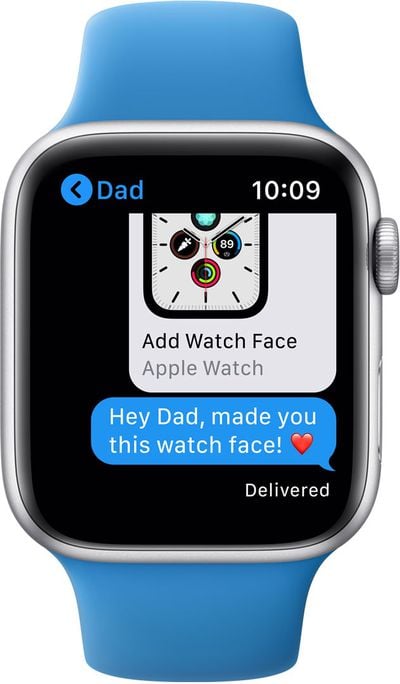
With watchOS 7, Apple is introducing a number of new health, fitness, and style features for the Apple Watch. There's a new Face Sharing feature that's designed to let you share your watch faces and install watch faces shared by other people, though you still can't create your own watch faces.
Apple introduced several new watch faces, including GMT that shows multiple time zones, Count Up for tracking elapsed time, Chronograph Pro with a tachymeter, Typograph for displaying numerals in custom styles, Artist with art by Jeff McFetridge, Memoji for putting a Memoji on Apple Watch, and Stripes in customizable patterns.
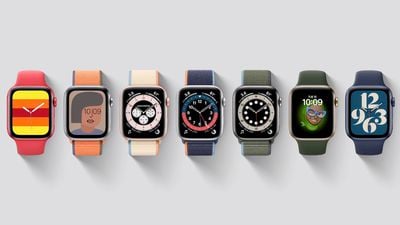
Apple has also added support for multiple complications for a single app so you can better customize your watch faces to suit your needs.
A new Sleep app lets you track your sleep by wearing your watch at night, providing sleep analysis in a simple, easy-to-interpret format. The watch uses the accelerometer to detect subtle movements associated with breathing, so it knows when you're sleeping or awake.
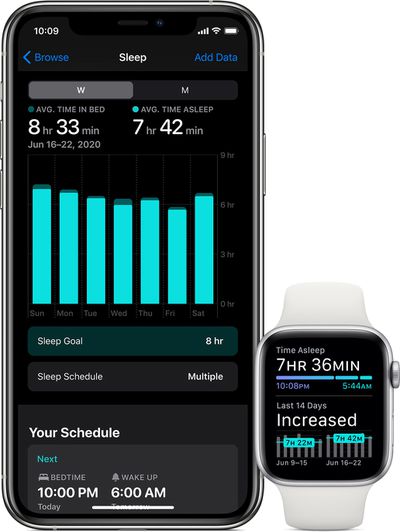
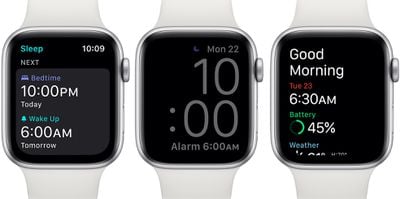
A Wind Down feature helps you establish a healthy bedtime routine, while Sleep Mode automatically turns off your screen and enables Do Not Disturb. When you wake up, the Apple Watch plays soft sounds or uses a haptic alarm, and it offers up a weather report and battery information so you can get your day started.
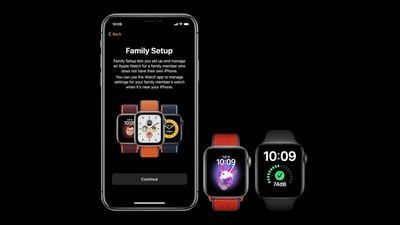
As announced yesterday, watchOS 7 brings a Family Setup option that lets iPhone owners manage and set up Apple Watches for children or older family members who don't own iPhones. Parents control contacts and downloaded apps, there's a Schooltime mode to limit Apple Watch features when necessary, and location tracking with Find My is available.
With Family Setup, kids can call and text their parents, talk to Siri, stream music, download apps, use the new Memoji app to create Memoji, and use Apple Pay with funds provided by parents. Family Sharing also includes Activity tracking options that provide Move minutes instead of active calories burned, and activity tracking has been optimized for children.
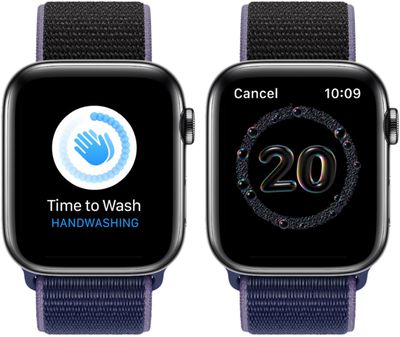
There's a new handwashing detection feature that's useful because we're all washing our hands more often than usual. It lets the Apple Watch listen for sounds of water and then starts a 20-second timer to remind you to wash your hands for the appropriate amount of time.
The Activity app has been renamed Fitness and there's a refined interface, and later this year, the Fitness app will work with the new Fitness+ service that lets Apple Watch owners access guided workouts on Apple TV, iPhone, and iPad. The new Fitness app also allows users to customize Activity goals, including Stand hours and Exercise minutes, and the Apple Watch is able to measure low-range VO2 max, stair ascent speed, stair descent speed, and six-minute walk estimate, all of which can be found in the Health app.
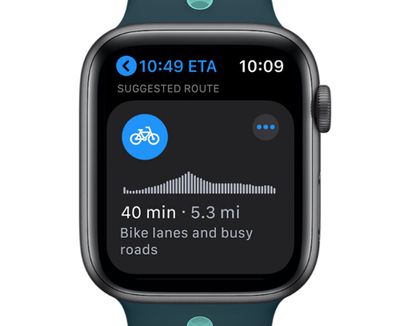
The Maps app features cycling directions in line with the new cycling feature on the iPhone, and Siri now provides spoken translations. Apple also introduced a new Siri Shortcuts app for the Apple Watch so you can access all your Shortcuts right on your wrist.
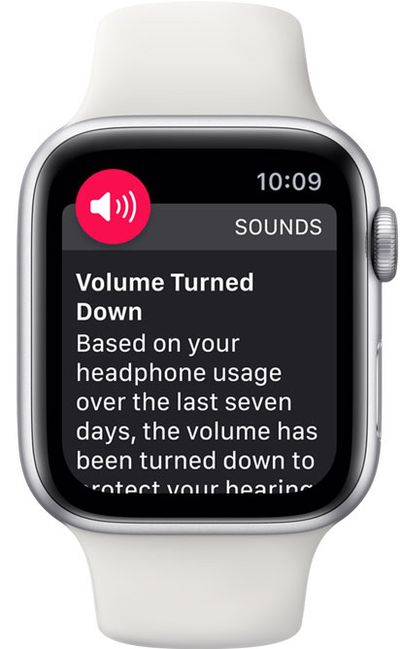
watchOS 7 does more to protect hearing health with a weekly listening notification and an option to automatically reduce loud sounds when you're wearing headphones. A max volume setting also helps to prevent hearing damage.
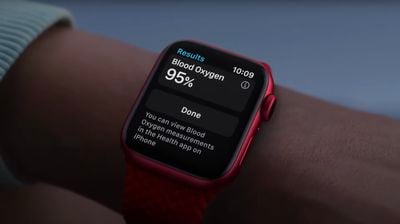
When paired with an Apple Watch Series 6, the Apple Watch offers a Blood Oxygen app that lets users take a blood oxygen reading. The Blood Oxygen app is limited to certain countries or regions and it requires an iPhone 6s or later to be paired with an Apple Watch Series 6.
Taking a Blood Oxygen reading can be done by opening up the app, staying still, tapping start, and keeping the arm steady for 15 seconds. Blood Oxygen monitoring uses red and green LEDs and infrared light, with photodiodes measuring the amount of light reflected back to determine the amount of oxygen in the blood.
There are many other new changes and tweaks in watchOS 7, and Apple's complete release notes for the update are below:
watchOS 7 makes Apple Watch more powerful and more personal than ever before—with new ways to discover and share watch faces, sleep tracking, automatic handwashing detection, and new workout types. Stay connected to your loved ones by pairing an Apple Watch for a family member to your iPhone with Family Setup. And watchOS 7 includes the Memoji app, cycling directions in Maps, and Siri language translation.
Watch Faces
- New Stripes face that lets you select the number of stripes you want, choose colors, and rotate the angle to create a watch face that reflects your style (Series 4 and later)
- New Typograph face with numerals in classic, modern, and rounded type styles and displayed in Arabic, Arabic Indic, Devanagari, or Roman (Series 4 and later)
- New Artist face created in collaboration with Geoff McFetridge that animates and morphs into a new creation with the time or when you tap the display
- New Memoji watch face features all the Memoji you have created and all of the Memoji characters (Series 4 and later)
- New GMT face that tracks a second time zone displaying a 12-hour inner dial with local time, and a 24-hour outer dial (Series 4 and later)
- New Chronograph Pro face that records time on scales of 60, 30, 6, or 3 seconds, or measures speed based on time traveled over a fixed distance with the new tachymeter (Series 4 and later)
- New Count Up face lets you easily track elapsed time by tapping the bezel (Series 4 and later)
- Share watch faces with Messages and Mail, or post a link online
- Discover and download curated watch faces from your favorite apps in the App Store or from websites and social media
- Support for rich complications on the X-Large face
- New color filters available to customize the Photos face
- New World Clock, Moon Phase, Altimeter, Camera Remote and Sleep complicationsSleep
- New Sleep app to help you meet your sleep duration goal with sleep tracking, custom sleep schedules, and a view of sleep trends over time
- Uses data from the accelerometer to detect when you are awake and when you are asleep
- Sleep mode minimizes distractions by turning on Do Not Disturb and turning off Raise to Wake and the display
- Wake up with alarm sounds and haptics on your watch
- Option to receive reminders to charge your watch before your scheduled bedtime and reminders when your watch is fully chargedHandwashing
- Automatic handwashing detection using motion sensors and microphone
- Once hand washing is detected, 20 second countdown starts
- Receive encouragement to keep washing for the recommended 20 seconds when watch detects you’ve stopped early
- Option to be reminded to wash your hands when arriving home
- Review how many times and how long you washed your hands in the Health app on iPhone
- Available on Apple Watch Series 4 and laterFamily Setup
- Use your iPhone to pair and manage a watch for your family members, with their own phone number and Apple ID
- Screen Time and Downtime support for managing contacts, setting communication limits, and scheduling time away from the screen
- Schooltime mode turns on Do Not Disturb, limits interaction, and replaces watch face with distinctive yellow clock
- Set a custom Schooltime schedule and view times when watch exits mode
- Users 13 and under can track Move minutes instead of active calories, and can track walking, running, and cycling workouts with more accurate metrics
- Set up one-time, recurring, or time-based location notifications for family members
- Send money to family members and review transactions of users under 18 with Apple Cash Family (US only)
- Family members have the option to share their activity and health data, and will be notified when you create automatic location notifications
- Requires Family Sharing and can be used with up to five family members
- Available on cellular models of Apple Watch Series 4 and laterMemoji
- New Memoji app to create new Memoji or customize existing Memoji
- New hairstyles, more age options, and three new Memoji stickers
- Use your Memoji creations in the Memoji watch face
- Send Memoji stickers in MessagesMaps
- Turn by turn directions with larger font sizes that are easier to read
- Cycling directions provide routes along bike lanes, bike paths, and bike-friendly roads, taking into consideration elevation or how busy a street is
- Search for and add places optimized for cyclists to your route, like a bike shop
- Support for cycling directions is available in New York City, Los Angeles, San Francisco Bay Area, Shanghai, and BeijingSiri
- On-device dictation for faster and more reliable request handling and further protecting privacy (Series 4 and later, US English only)
- Translate phrases right on your wrist, with support for over 50 language pairs
- Adds support for Announce MessagesOther features and improvements:
- Change goals for exercise minutes and stand or roll hours in the Activity app
- New custom algorithms in the Workout app for Dance, Functional Strength Training, Core Training, and Cooldowns for accurate tracking of relevant metrics
- Redesigned and renamed Fitness app on iPhone with streamlined summary and sharing tabs
- Manage health and safety features of Apple Watch in the Health app on iPhone with new Health Checklist
- New Mobility metrics measured by Apple Watch available in the Health app, including low-range VO2 max, stair ascent speed, stair descent speed, and six-minute walk estimate
- ECG app on Apple Watch Series 4 or later now available in Colombia, Israel, Kuwait, Oman, Qatar, and United Arab Emirates
- Irregular heart rhythm notifications now available in Colombia, Israel, Kuwait, Oman, Qatar, and United Arab Emirates
- Support for additional interactions on Apple Watch Series 5 without having to wake the display including access to Control Center and Notification Center, the ability to change watch faces, and more
- Create group threads in Messages
- Inline replies let you reply to a specific message and see all related messages in their own view
- New Shortcuts app to access and run shortcuts you have previously created
- Add shortcuts to your watch face as a complication
- Share your audiobooks with Family Sharing
- Search now available in the Music app
- Redesigned Wallet app
- Digital car key support in Wallet (Series 5)
- View downloaded media in Music, Audiobooks, and Podcasts apps
- Current location available for World Clock and Weather apps
For more on all of the new features available in the watchOS 7 update, make sure to check out our watchOS 7 roundup.




/https://forums.macrumors.com/attachments/954297/)













































