

Make Dark Mode Darker in macOS Big Sur With New Toggle to Disable Wallpaper Tint - MacRumorsOpen MenuShow RoundupsShow Forums menuVisit ForumsOpen Sidebar
Skip to Content

Make Dark Mode Darker in macOS Big Sur With New Toggle to Disable Wallpaper Tint

The fourth beta of macOS Big Sur, released yesterday, adds a new toggle in System Preferences that's designed to disable the wallpaper tinting feature that's meant to make windows blend in with the desktop wallpaper.
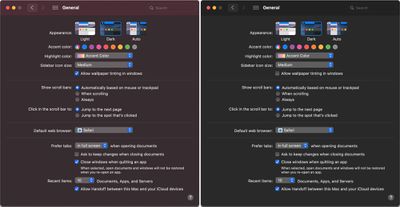
darkmodecomparison
For those who have Dark Mode enabled, turning off wallpaper tinting can make windows on the Mac noticeably darker, especially when a lighter color background is in use.

Apple introduced the wallpaper tinting feature in an earlier version of macOS, and some Mac users who prefer ‌Dark Mode‌ have been hoping for a toggle to disable it. Prior to now, there was a method for turning it off, but it involved enabling the graphite accent color.
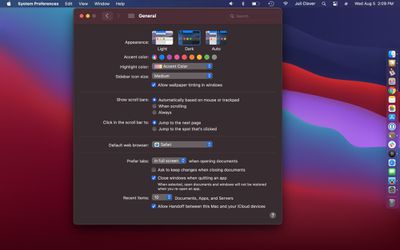
wallpapertintingon

With wallpaper tint on

As 9to5mac points out, being forced to choose graphite was not ideal because it eliminated many of the colored elements of the operating system. With macOS Big Sur, wallpaper tinting can be disabled while leaving the rest of the interface untouched.
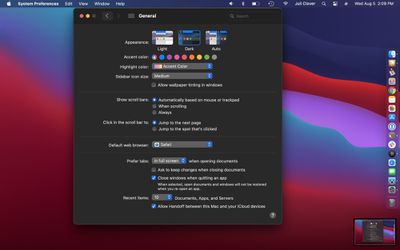
wallpapertintingoff

With wallpaper tint off

Disabling wallpaper tinting will only make a difference to those who use ‌Dark Mode‌, as it does not change the way that windows look in Light Mode. It's small but subtle change that some ‌Dark Mode‌ users will appreciate, and it only applies to windows, and not other elements of the interface like side bars.

The feature can be accessed by opening System Preferences, selecting General, and then clicking on the toggle that says "Allow wallpaper tinting in windows."


Related Forum: macOS Big Sur

Popular Stories

Apple Event Logo

Apple Working on All-New Operating System

Wednesday July 29, 2026 11:39 am PDT by
Apple is developing an all-new operating system that is essentially a mix of tvOS, watchOS, and iOS, according to Bloomberg's Mark Gurman. In a report this week, he said the operating system will feature a grid of icons, widgets, and apps, along with customizable clock faces. The new software platform is intended for Apple's long-rumored smart home hub. With built-in facial recognition,...
imac video apple feature

Apple Made Its Second-Biggest Acquisition Ever This Year

Wednesday July 29, 2026 12:03 pm PDT by
Apple this year acquired Israeli startup Q.ai for close to $2 billion, according to the Financial Times. That would make this Apple's second-biggest acquisition ever, after it paid $3 billion for the popular headphone maker Beats in 2014. This is also the largest known Apple acquisition since the company purchased Intel's smartphone modem business and patents for $1 billion in 2019. Q.ai...
Dynamic Island iPhone 18 Pro Feature

iPhone 18 Pro: Twelve Changes Coming to Apple's Next Flagship

Thursday July 30, 2026 3:43 am PDT by
We're less than two months out from the launch of Apple's premium next-generation smartphone lineup, and while we're not expecting a dramatic change in terms of functionality, there are still several enhancements rumored to be coming to the iPhone 18 Pro and iPhone 18 Pro Max. One thing worth noting is that Apple is reportedly planning a major change to its iPhone release cycle this year,...

Top Rated Comments

Internet Enzyme Avatar
78 months ago

Big Sur peeps, what's the difference between this and enabling 'Reduce Transparency'?
Reduce Transparency affects sidebars, immersive toolbars, and the menu bar and the dock, whereas tinting affects the material color of the windows themselves. Look at the side-by-side at the top of the article.
Score: 7 Votes (Like | Disagree)
78 months ago
We need this for light mode too!

Let me turn off the transparancy / translucence where my active window content changes willy nilly based on what is behind it.
Score: 5 Votes (Like | Disagree)
zorinlynx Avatar
78 months ago
When light mode is enabled, the menu bar on the top is still in dark mode.

Is this an intentional change or a bug? I already reported it, but haven't heard back and it's still unchanged in the latest beta.

I'm one of those rare unicorns known as a "Light mode user" and hate that the menu bar doesn't respect the setting anymore in Big Sur. :(

Score: 4 Votes (Like | Disagree)
78 months ago
translucent windows and menus are always the first thing I disable on all of their OSes.
Score: 4 Votes (Like | Disagree)
Internet Enzyme Avatar
78 months ago
Wallpaper tinting has gotten really intense in Big Sur. I like it because it adds some whimsy, but whenever you add some whimsy you need an option to turn it off.
Score: 4 Votes (Like | Disagree)
djbuddha Avatar
78 months ago

There is. sudo softwareupdate -i -a --restart
You’re not funny. Somebody will actually take you seriously
Score: 3 Votes (Like | Disagree)

🔗 Related Apple News & Rumors

Stay updated with the latest Apple ecosystem news and verified rumors










































