

Demo: Upgrading the RAM in the 2019 Mac Pro After Purchase - MacRumorsOpen MenuShow RoundupsShow Forums menuVisit ForumsOpen Sidebar
Skip to Content

Demo: Upgrading the RAM in the 2019 Mac Pro After Purchase

Apple designed the Mac Pro to be modular and upgradeable, and it's possible to upgrade components that include the SSD and the RAM.

We purchased a base model Mac Pro with the intention of upgrading the RAM after the fact using hardware from OWC, and in our latest YouTube video, we demo swapping out the RAM, which is a straightforward process, but still needs to be done carefully.

Watch on YouTube

The base model Mac Pro ships with 32GB 2933MHz RAM, but the machine supports up to 1.5TB and has a total of 12 DIMM slots. For the maximum amount of RAM, you do need the 24 or 28-core processors, as the 8, 12, and 16-core options are limited to 768GB of RAM.

Upgrading RAM can be done with other LR-DIMMs or R-DIMMs, but the different memory types can't be mixed with one another. Apple recommends Mac Pro owners make sure to use the same type of memory when installing additional DIMMs or replacing DIMMs.

Apple also recommends using Apple-approved DIMMs purchased by visiting an Apple retail store or an Apple Authorized Reseller, but Apple RAM is super expensive and most upgraders are likely going to want to go with something that saves some cash.

DIMMs can be installed in configurations of 4, 6, 8, or 12, and Apple has a visual aid on how different setups should work in its support document.

Swapping out or adding RAM to the Mac Pro requires the machine to be off, cool, and unplugged. Pulling off the outer aluminum casing is required, and then from there, the DIMM slots are accessible. Existing DIMMs can be accessed by unlocking the DIMM covers, sliding them open, and then using the DIMM ejectors to push it out of the slot.

Putting in new DIMMs can be done by adding a DIMM to an empty slot, seating it in place, and then making sure the DIMM ejectors click closed.

Apple has a very detailed support document that outlines replacing the RAM, and for Mac Pro owners, we recommend reading it thoroughly and following each of Apple's specific steps. Apple warns that causing damage by replacing components in the wrong way won't be covered under warranty, so it's best to use caution and be thorough when upgrading a part.

Apple has a bunch of support documents and tutorial videos dedicated to the Mac Pro, which we've rounded up. Apple covers everything from installing new RAM to swapping out GPU modules to replacing the power supply and I/O card.

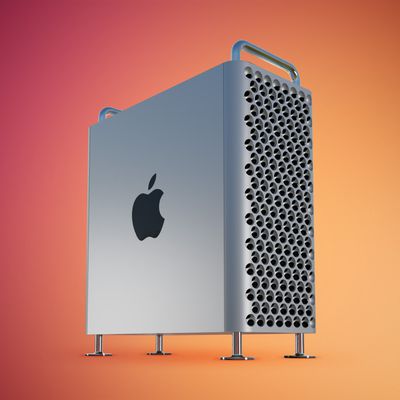
Buyer's Guide: Mac Pro (Don't Buy)
Related Forum: Mac Pro

Popular Stories

iPad mini 7 Review Thumb 1 sans text

Apple Raises iPad and Mac Trade-In Values

Monday October 26, 2026 8:17 am PDT by
Apple today updated its U.S. trade-in estimates, raising maximum values across the iPad lineup and for most Macs following today's announcement of the new iPad mini. Every iPad category has gained value, although the increases are relatively modest. The iPad mini and standard iPad both rise by $20, while the iPad Air gains $15 and the iPad Pro increases by $10. The revised maximum estimates...

Mac Pro Feature Red

Conversion Kit Aims to Put PC Hardware Inside 2019 Mac Pro

Monday October 26, 2026 4:24 am PDT by
Owners of Apple's 2019 Mac Pro could repurpose its enclosure for a custom PC using a conversion kit being crowdfunded by Practical Prototyping (via Hackster). The project comes after Apple discontinued the Mac Pro in March, confirming that it has no plans for future models. For owners of the 2019 Intel-based tower, the conversion offers a potential way to keep using its distinctive...
iPhone Duo Display Cracking

Apple Alerts Stores to iPhone Duo's Display Cracking Issue

Friday October 30, 2026 3:20 pm PDT by
In a memo shared with Apple Stores and Apple Authorized Service Providers this week, and later obtained by MacRumors, Apple provided technicians with guidance on how to diagnose and address the iPhone Duo's inner display cracking issue. If a customer reports the issue, Apple advised technicians to inspect the iPhone Duo and repair or replace it in accordance with their standard procedures....

Top Rated Comments

W.O.P.R. Avatar
90 months ago

Only a matter of time before that OWC RAM fails.
Only a matter of time until the sun goes dark.
Score: 16 Votes (Like | Disagree)
90 months ago
If you buy Mac Pro do you really need a guide on how to put in extra RAM? :D
Score: 14 Votes (Like | Disagree)
martinX Avatar
90 months ago

the 8, 12, and 16-core options are limited to 768GB of RAM.
We truly live in wondrous times.
Score: 10 Votes (Like | Disagree)
Duane Martin Avatar
90 months ago

It's misleading to state "it's possible to upgrade components that include the SSD".

Apple tied the SSD to the T2 chip and to reset that, you need Apple's help!
Yes, the SSDs that ship with the Mac Pro are tied to the T2 chip and you do need Apple to replace those but they are still upgradeable. Those are not mutually exclusive statements. As well, you can add additional storage to the Mac Pro and I suspect we are only getting a hint of the possibilities so far.

Watching the RAM replacement makes me long for the days I could do that in all of my Macs (and everyone else's Macs as many people came to me for help; I used to work at a Mac Certified Reseller). Ah yes, those heady days of failed chips, troubleshooting, broken connectors and locks, damaged shielding, the "honestly it came that way I didn't break it". You honestly haven't lived until you have experienced the "death by a 1000 cuts" as you tried to replace RAM in the 8500/9500 series; I know some of you will remember. Still, despite the pains that were sometimes incurred there was huge value in buying what I could afford now and upgrading when I could afford more later. Bring on more videos like this, MR, so I can live vicariously.
Score: 9 Votes (Like | Disagree)
slide_to_unlock Avatar
90 months ago
Next video: How to turn on and login into Mac pro for "professionals".
Score: 8 Votes (Like | Disagree)
casperes1996 Avatar
90 months ago

Is there any reason not to also install the 32 GB that came with the machine anyway? There's 12 slots. Apple's document at https://support.apple.com/en-us/HT210405 mentions "Use the same size memory modules across all slots to maximize performance", might be a good idea to benchmark this 512 GB, and '512 GB + 32 Gb' configurations?

I am totally out of the loop in that I've never bought a Mac Pro ever since Apple went Intel, the last PowerMac I had was a G4 (I'm carbon dating myself here ;)), my G3 and G4 powermacs never cared about different size DIMMS, I'd happily run 64 MB (not GB...) and 128 MB and 256 MB together...
The following is not based on knowledge of the specific architecture of the Mac Pro, but general computer knowledge. Disclaimer over.

These CPUs support hex-channel memory. This means that the CPU will have six channels of communication to the memory. This can only be achieved if 6 or 12 slots are populated, so the CPU has either 1 or 2 DIMMs per communication channel. If 4 or 8 are populated it'll run in quad-channel mode.

Let's pretend we populate 8 slots with 64GB sticks, and 4 with 8GB sticks. If we put 1GB of data in each DIMM and try and access all that data, all at once, this will actually be faster than if we had only the 8 64GB DIMMs, since we can access the 1GB of data on 6 DIMMs simultaneously, versus putting the same amount of data on only 4 communication lines.
However, if we load up all the memory modules to the brim, the larger memory modules will obviously be used much more than the smaller modules when accessing all the data, since they just hold a larger percentage of it. This means the communication lines will be used unevenly and it won't scale the speed of communication as well. It in most any situation won't be slower than the case with only the 8, should in fact be faster, but not as fast as fully spreading the load across all 6 channels with evenly sized modules.

The very worst case would be having a single huge module and 5 tiny ones. Since almost all data would be stored just on the huge one, and not so much on the five smaller ones, communication from the CPU would almost effectively become single channel. - The point is more that if you want 256GB of memory, it is better performance wise to get it in 6 or 12 evenly sized modules, than it is to get a few huge ones and load the remaining with small ones, so they all can give and receive data simultaneously


Only if you want to install DIMMs in the correct configuration.
On the back of the memory cover the diagram of configurations is shown :)
Score: 7 Votes (Like | Disagree)
Latest Stories
Nearly Every M5 MacBook Air Now $200 Off on Amazon
50 minutes ago
Apple's HomeView Ships With Six-Month-Old Software
3 hours ago
Three New iPads Rumored to Launch in First Half of 2027
3 hours ago
Apple Offers Steps to Fix Daylight Saving Time Bug on Apple Watch
7 hours ago
Apple Watch Ultra 4 Hits All-Time Low Price With Amazon's $99 Discount
1 day ago
Reminder: Apple's Big Discount on Beats 360 Ear Cushions Ends Today
1 day ago
Here's a New Tour of Apple's HomeView Software
1 day ago
Apple Reveals New iPad Mini's Battery Capacity
1 day ago
Top Stories: Apple's Big MacBook Pro, iPad mini and iMac Updates
1 day ago
'Pluribus' Season 2 Reportedly Starts Production Today
1 day ago
iPhone 18 Pro Sales Surge in China, Offsetting Decline in U.S. and Japan
1 day ago
HomeView Software 27.2: Wallpapers, Control Center, and More
2 days ago
Apple Alerts Stores to iPhone Duo's Display Cracking Issue
2 days ago
iOS 27.3 Will Enable These Apple Intelligence Features in China
2 days ago
Apple Says iOS 27.3 Beta Coming Next Week
2 days ago
Apple's Flash Storage Suppliers Are Finally 'Getting Their Revenge'
2 days ago
14 New Things Your iPhone Can Do in iOS 27.2
2 days ago
iPhone Duo Review: One Week Later
2 days ago
Samsung Mocks iPhone Duo Display Cracks in New Ad Campaign
2 days ago
The MacRumors Show: OLED MacBook Pro, iPad Mini 8, and More
2 days ago
MacBook Pro With Touch Display: 15 More Details Revealed
2 days ago
Russia Places Apple on State Surveillance Registry
2 days ago
Halloween Weekend Brings Discounts on Apple Accessories and Pre-Orders
2 days ago
Apple Has Released More Than 25 New Products in the Past Two Months
2 days ago
Local Code Launches as Free, Private AI Assistant Tool for Mac
2 days ago
Apple Acquires Ascend.io
2 days ago
HomePod Mini 2 Launches Today: All the New Features
2 days ago
AirTag 2 4-Pack Drops to New Low Price of $69.99
2 days ago
Rian Johnson's iPhone Camera App Goes Viral
2 days ago
Where Did All the iPhone Duos Go? Mostly to Apple's Stores
2 days ago

🔗 Related Apple News & Rumors

Stay updated with the latest Apple ecosystem news and verified rumors










































