

How watchOS 5 Brings Rich Web Content to Messages and Mail on Apple Watch - MacRumorsOpen MenuShow RoundupsShow Forums menuVisit ForumsOpen Sidebar
Skip to Content

How watchOS 5 Brings Rich Web Content to Messages and Mail on Apple Watch

Apple's latest version of watchOS promises to bring rich HTML content to the wrists of Apple Watch users, thanks to new Webkit optimizations that improve apps like Mail and Messages.

Apple expanded on the new WebKit features at a WWDC session, in which it explained to developers how they can optimize web content for viewing on Apple Watch screens.
watchos 5 rich html content
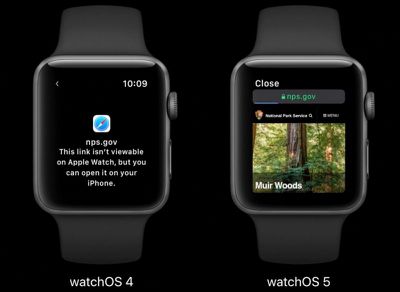
Currently in the watchOS Mail app, rich HTML messages are rendered in a text-only format and users are prompted to view the content on another device for the full experience.

Likewise, tapping a URL link received in Mail or Messages directs Apple Watch users to their iPhone to view the web page.

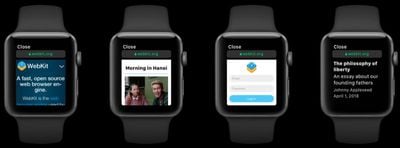
However, in watchOS 5, full HTML emails are capable of being displayed on Apple Watch in cases where text-only formatting can't express the content of the message, and users can also view web page links, as well as interact with them, albeit in a limited way.

For example, turning the Digital Crown on Apple Watch scrolls the HTML content vertically, or users can drag with their finger to move up and down the page, while double-tapping zooms the content in and out, similar to iPhone.

In a Force Touch addition, a firm press on the Apple Watch screen reveals back and forward buttons to navigate through your viewing history (swiping left and right does the same thing).
watchOS 5 rich web content
Apple says it achieved the WebKit optimizations by shrinking the 320-pixel display used by the iPhone SE to fit the 156-pixel width of the Apple Watch display, and then computing the initial scale of the page so that the content width fits within the smaller screen. Basically, this allows text and images to appear smaller while preserving the overall layout of the page.

Apple notes that the optimizations are aimed at quickly consuming content, so some features like video playback and web fonts aren't currently available. However, users will be able to interact with forms within HTML content, and there's also an Safari-like Reader mode, which automatically activates on text-heavy web pages (the Reader Mode option is also accessible via Force Touch, so users can choose to read pages on their watch with extraneous content stripped out).

watchOS 5, due for release in the fall, promises several other improvements and features, including Walkie-Talkie for touch-to-talk communications with friends, automatic workout detection, and updates to the Siri watch face.


Related Roundup: Apple Watch 11

Popular Stories

3 4 24 Sport Band Refresh Feature

Sketchy Rumor Claims Apple Watch Series 12 Could Introduce Sensor in Band

Friday July 3, 2026 8:54 am PDT by
The Apple Watch Series 12 could ship with a new health sensor built directly into one of its bands, according to a sketchy rumor from a known leaker. The leaker known as "Kosutami" says the sensor will be injection-molded into a silicone band, and only a silicone band, apparently because Apple has not yet solved how to embed similar hardware in bands made from other materials. No detail was...
watchos 27

Siri AI Comes to Apple Watch in watchOS 27 Beta 3

Monday July 6, 2026 1:24 pm PDT by
With watchOS 27 beta 3, Apple added support for Siri AI and the Siri app, so Apple Watch users can now use the features right from their wrist. Apple said Siri AI would be coming to the watch back when watchOS 27 was first introduced, but the feature wasn't live until now. The Dynamic App Grid that pops up when the Digital Crown is pressed displays the Siri app in the center, and the...
Apple Watch Series 10 Jet Black

Apple Watch Series 13 Rumored to Mark the End of an Era

Wednesday July 8, 2026 1:29 pm PDT by
While the Apple Watch Series 12 is still a few months away, a new rumor suggests that next year's Apple Watch Series 13 will mark the end of an era. According to a recent post from a known leaker on the Chinese social media platform Weibo, the Apple Watch will be receiving a major redesign next year, and this will apparently include a new way of attaching bands to the watch. As a result, the ...

Top Rated Comments

ArtOfWarfare Avatar
106 months ago
I get the sense that Apple still doesn’t know what they’re doing with the Apple Watch and they’re just throwing ideas at it and seeing what sticks.
Score: 6 Votes (Like | Disagree)
106 months ago
I get the sense that Apple still doesn’t know what they’re doing with the Apple Watch and they’re just throwing ideas at it and seeing what sticks.
They must be doing something right, with its popularity. However, Can you elaborate on this? I mean it’s rather vague what you’re saying. In terms of where watchOS once was and where it is now, how is it “They don’t what they’re doing”? I also think anytime Apple introduces something new, it must have some type of acceptance in order for it to be useful to somebody. I’m not sure how others don’t expect software to expand if they don’t try new things.
[doublepost=1528369066][/doublepost]
Am I the only one that thinks the screen is way too damn small to read an article on a holiday destination as demonstrated?
I just think it’d look really dumb and feel really dumb if you were squinting at this tiny little screen scrolling thru an article.

Just pull out your phone it’d be so much quicker!!.

We know the iPhone would serve a different purpose for a larger display, but Apple Watch is nice because you don’t have to have your iPhone with you all the time to glance at the display to see something and then revert to the iPhone if you want to. OtherWise, it sounds like the Apple Watch isn’t really for you based on your concerns over a small screen, given its alternative functionality.
Score: 5 Votes (Like | Disagree)
Blackstick Avatar
106 months ago
I have this justifiable feeling my Series 1 is going to be dog slow when this rolls around in September.
Score: 5 Votes (Like | Disagree)
macduke Avatar
106 months ago
Can I, as a web developer, set a 156px media query breakpoint to target the Apple Watch specifically or is this an automatically scaling only thing with no way to override it? I can't even test the beta on my Series 0 and won't upgrade until the Series 4 this autumn.

I kind of want to be cheeky and put up a fixed position overlay that says in white on black background: NO.

But in all seriousness though, I feel like some of my designs are robust enough that I could scale the text size up and make it a little more usable with a simple media query. I've often been frustrated when my wife sends me a link to something on my Watch and I can't just tap it to see what it's about really quick. It would be neat if when opening a link you could force touch and bring up a button to send a reminder to your iPhone lock screen that, when tapped, will open up the webpage on the device whenever you get around to it.
Score: 2 Votes (Like | Disagree)
106 months ago
I’m pretty excited to see this myself. I think most of my emails contain HTML and while o don’t want a full desktop experience, right now those emails are impossible to check on the Watch. If this can at least make the more simple ones readable I think it’ll be a great update.
Score: 2 Votes (Like | Disagree)
justiny Avatar
106 months ago
I get the sense that Apple still doesn’t know what they’re doing with the Apple Watch and they’re just throwing ideas at it and seeing what sticks.
I disagree. Apple has dramatically improved the Watch far beyond what we saw with the first generation.

That being said, displaying HTML and web content on a tiny display is not a critical feature. The Watch excels in several different ways, and I’d rather not see Apple stretch certain features beyond its capabilities.

If this destroys the battery life or throttles the performance, the juice isn’t worth the squeeze.
Score: 2 Votes (Like | Disagree)

🔗 Related Apple News & Rumors

Stay updated with the latest Apple ecosystem news and verified rumors









































