

Bluetooth-enabled appliances and electronics that connect everyday household items to smartphones and tablets are becoming increasingly popular, giving us a whole range of connected things -- thermostats, coffee makers and mixing bowls, cars, and even connected toothbrushes, like the Oral-B SmartSeries toothbrush lineup, which features Bluetooth toothbrushes that are compatible with an iPhone app.
Oral-B showed off its first smart toothbrush in early 2014, and began shipping the $125 Oral-B Pro 5000 SmartSeries with Bluetooth later in the year. We caught up with Oral-B at CES in 2015 and got our hands on an Oral-B Pro 5000 so we could share the connected toothbrush experience with MacRumors readers.
Connected toothbrushes are set to take off in 2015, so this is a good time to explore available options and see what they can do for you. Oral-B has a second higher-end model coming out this year, and the Kolibree toothbrush, which gamifies brushing, is finally launching in a few months.
What's in the Box
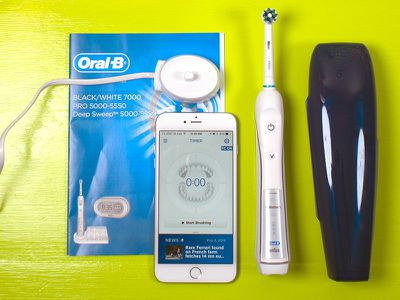
The Oral-B Pro 5000 SmartSeries with Bluetooth ships with the toothbrush itself, a brush head, a stand for charging, a travel case, and a guide that walks you through how to pair the toothbrush to an iPhone. There's also a stand to hold multiple brush heads, but as you'll see later in this review, the brush and its accompanying app isn't really suited for more than one user.
The Toothbrush
The Oral-B Pro 5000 SmartSeries with Bluetooth is essentially the company's standard Oral-B Pro 5000 toothbrush with a Bluetooth upgrade. This brush has been around for quite some time and has racked up thousands of reviews on Amazon.
For that reason, we won't go into a great amount of detail on the brush itself, but we'll hit a few major points that are worth knowing. First of all, the Oral-B Pro 5000 is a rechargeable electric toothbrush that that oscillates and rotates to keep your teeth cleaner than a manual brush.
The Oral B-Pro 5000 ships with Oral-B's standard round Precision Clean brush head, with bristles that are designed to get between teeth. The round brush head is a bit too large for small mouths and can be difficult to use, but Oral-B also makes a range of other brush heads that are compatible with the toothbrush. Brush heads need to be replaced every three months, but Oral-B's are fairly cheap at around $7 per head.
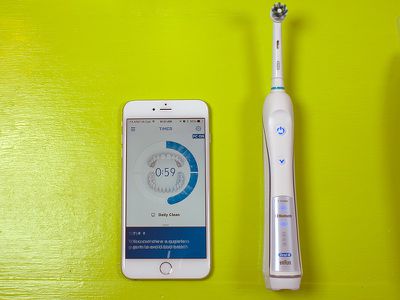
In comparison to a Sonicare toothbrush, Oral-B's leading competitor, the Oral-B sounds louder, feels bulkier, and seems much more powerful against the teeth. There's quite a bit of difference between the two brands -- Oral-B uses rotating-oscillating strokes while Sonicare uses high-velocity lateral vibrations (aka side-to-side vibrations).
Electric toothbrushes like the Oral-B 5000 clean the teeth effectively with minimal effort, but they're also great for preventing damage to the gums because they're gentle. The Oral-B is especially useful in this regard because it has a built-in pressure sensor with an indicator light that will flash red whenever you're pressing harder than you should.
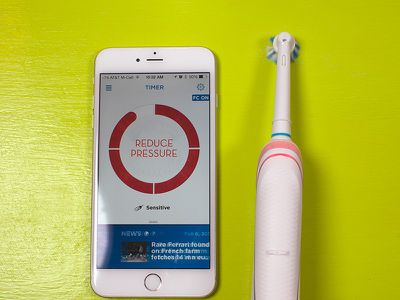
Brushing with the Oral-B 5000 is meant to be done in quadrants, with a minimum of 30 seconds spent on each section of the mouth. The brush will buzz in 30 second intervals even when not connected to the app to let you know what section of your mouth to focus on, and these intervals can be modified with either built-in modes or customizable options. There are five included modes: Daily Clean (default), Sensitive (lower speed), Whitening (polishes surface stains away), Massage, and Deep Clean (longer time period).
The App
The Oral-B app, available for free, is where all the magic happens with the Oral-B Bluetooth toothbrush. Connecting the brush to the app is as simple as turning on Bluetooth on the iPhone and opening the app, where the toothbrush is automatically recognized.
The app is meant to used alongside the toothbrush, so the idea is to open the app and then start brushing, which causes a two minute timer to start counting down. You're supposed to spend 30 seconds on each quadrant of your mouth (upper left, upper right, lower left, and lower right) and a 3D mouth image guides you through the brushing process. There's no way for the brush to tell what section of your mouth you're focused on, so it's up to you to make sure you follow along.
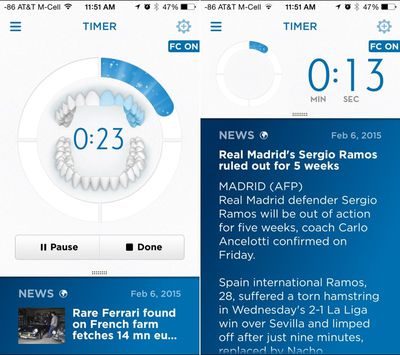
While you brush, the app displays interesting photos, news stories, daily weather forecasts, upcoming calendar events, quotes, fun facts, brushing tips, and more, to give you something to look at. Two minutes may not seem like a long time, but brushing that long can get tiresome without entertainment.
Be warned: we frequently got flecks of toothpaste and water on an iPhone while testing the brush, an occurrence that seems impossible to avoid attempting to hold a phone and brush at the same time. There were two other features, or lack thereof that bothered us: there's no way to see how much battery life is left on the brush and there's no way to customize the content drawn into the app.
The app's content is hit or miss sometimes, depending on your interests. For example, I didn't have much interest in the opening of an art collection at a Dutch museum or the Six Nations Rugby championship, but the app displayed this news anyway. It would be nice for users to be able to choose content from favorite websites or social networks instead as a better brushing motivator.
If you want to avoid toothpaste on your iPhone or if you don't care for the app's content, you can also brush without it and sync your statistics to the app later on. The toothbrush will store up to 20 brushing sessions before it needs to connect to the iPhone to relay information, and we had no problems with syncing brushing sessions after the fact.
At the end of the brushing session, the app rewards you with a happy face and information on how long you brushed -- if you met two minutes. If you didn't, you get a face that's slightly disappointed, which is a solid motivator to meet that two minute mark.
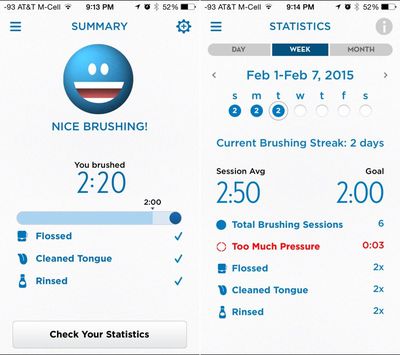
The end of a session will also bring up a menu asking if you flossed, rinsed with mouthwash, and cleaned your tongue. One major downside to brushing without the app is that you can't seem to manually enter when you floss or rinse (these can only be ticked off after the app's timer has run), so you can't keep track of these elements if you want to brush without the app open.
After brushing, you can tap to view your statistics for the day, week, or month. The app tracks how long you brush, how often you brush, whether you applied too much pressure while brushing, and how often you flossed, cleaned your tongue, and rinsed. Rotating to landscape mode shows brushing statistics in a bar graph. Personal bests for session length, brushing streak, and more are shown in an "Achievements" section of the app, as are achievements that can be earned by fulfilling tasks like brushing for 7 days during lunchtime, or brushing consistently at night.
In the Custom Care section of the app, you (or your dentist) can create custom timers and "Focused Care Zones," which are spots where you'll be prompted to do extra brushing following a regular brushing section. The ability to set up custom brushing plans that are relayed to the toothbrush is one of the most useful features in the app.
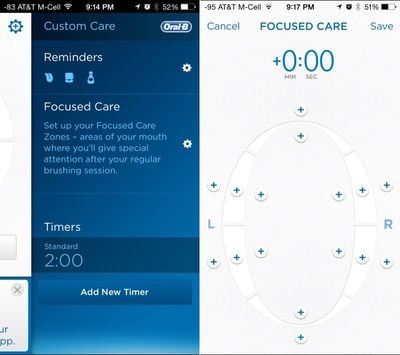
Tapping one of the + sections of the Focused Care menu adds 10 seconds of brushing to a particular part of the mouth, which will be added to each brushing session. The app will prompt you to perform this extra brushing and display the areas that need extra attention, so this is another instance where brushing without the app is less useful.
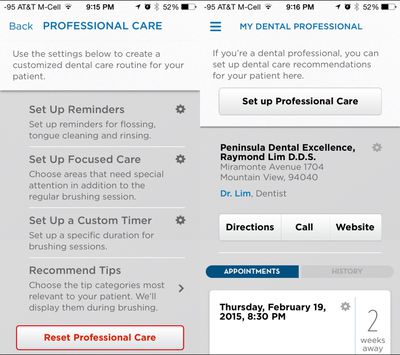
There's a section of the app that's specifically designed for dentists, where a dentist can set up reminders, custom timers, or Focused Care areas that need more attention based on what he or she sees during a cleaning or examination. This section also lets you find your dentist to store information like phone number and upcoming appointments.
Finally, the app also includes a selection of oral care tips and a "Shop" section, which takes you to the Oral-B website in Safari to purchase toothbrushes and replacement brush heads.
Overall, the app is a useful tool for keeping yourself motivated to brush and for tracking brushing statistics. Setting up custom brushing routines that can be beamed to your toothbrush is the app's best feature, as it isn't possible with standard electric toothbrushes.
Many people share these toothbrushes and swap in brush heads, which is not really an option with this particular toothbrush. There is no solid way to keep track of multiple brushers with the app. Multiple people can download the app and sync with the same brush, but the brush can't tell the difference between two people so all the data is downloaded into each instance of the app, muddling the results.
Who's it For?
According to a dentist that MacRumors spoke with, the Oral-B 5000 or a similar electric toothbrush is recommended for all patients. Toothbrushes like these, as mentioned above, are highly effective and gentle on the gums, keeping users from brushing too hard.
In a more practical sense, anyone who is planning to shell out the cash for an electric toothbrush might want to give the Oral-B 5000 Bluetooth option a look. It's priced comparatively to a non-Bluetooth electric toothbrush and the app brings a whole range of useful features.
Earning a smiley face might not sound like much of a motivator, but in practice, it can encourage longer brushing, as can the news stories and guide to follow along with. The reminders to brush, floss, and rinse are also valuable, especially if you often forget to do these things.
You can give the Oral-B app a try without shelling out the cash for the toothbrush. It's a free download from the App Store and it can work independently from the Bluetooth toothbrush as long as you're willing to start the timer manually. There's also a feature that'll start the timer based on the sound of an electric toothbrush, which is handy. You lose out on the pressure sensing and some of the custom programming abilities, but it's a good way to test it out to see if tracking your brushing is right for you.
Pros
- Custom timer options
- Encourages longer brushing times
- Encourages flossing, rinsing with reminders
- Pressure sensor
- Adds more functionality to an already useful product
Cons
- Can't manually enter flossing/rinsing
- App is iPhone only
- No support for multiple users
- No support for custom content
How to Buy
The Oral-B Pro 5000 SmartSeries toothbrush with Bluetooth has an MSRP of $160, but it can currently be purchased from Amazon for $124.99.

















































Top Rated Comments
This is ... stupid.
Now a washing machine that tells me I have damp clothes ready for the dryer or a fridge that tells me I'm out of milk, sign me up!
Is no support for multiple users really a Con? Who shares their toothbrush?
But this is overcomplicating a simple activity.
----------
It's a lot cheaper than dental work!
you can switch out the heads
You know when you're applying too much pressure because the noise changes, or because the toothbrush slows down, or on some models, the damn thing lights up.
You know when you've brushed for 2 minutes because it switches itself off.
If we're getting to the point where people need an app to remind them how to brush their teeth, we've hit an all time low.