

Apple Releases OS X 10.9.3 With Enhanced Support for 4K Displays, Syncing Improvements - MacRumorsOpen MenuShow RoundupsShow Forums menuVisit ForumsOpen Sidebar
Skip to Content

Apple Releases OS X 10.9.3 With Enhanced Support for 4K Displays, Syncing Improvements

Apple today released OS X 10.9.3, after two months of developer testing. The last 10.9.3 developer beta, build 13D61, was released just over a week ago.

The update, which is recommended for all Mavericks users, improves 4K display support on the late 2013 Mac Pro and 15-inch MacBook Pro with Retina display. According to the release notes, it also re-adds the ability to sync contacts and calendars between Macs and iOS devices using a USB connection and it improves the reliability of VPN connections using IPSec.

Today's update also includes Safari 7.0.3, and Apple has released iTunes 11.2 as well.
mavericks

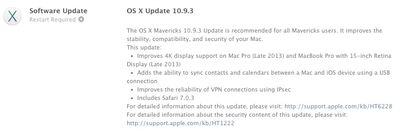
The OS X Mavericks 10.9.3 Update is recommended for all Mavericks users. It improves the stability, compatibility, and security of your Mac.
This update:

- Improves 4K display support on Mac Pro (Late 2013) and MacBook Pro with 15-inch Retina Display (Late 2013)
- Adds the ability to sync contacts and calendars between a Mac and iOS device using a USB connection
- Improves the reliability of VPN connections using IPsec
- Includes Safari 7.0.3

For detailed information about this update, please visit: http://support.apple.com/kb/HT6228
For detailed information about the security content of this update, please visit: http://support.apple.com/kb/HT1222

First outlined after the initial 10.9.3 beta, the improved 4K support enables HiDPI Retina scaling on 4K displays for the 2013 Mac Pro and Retina MacBook Pro with DisplayPort 1.2, which improves the size and readability of text and other on-screen elements. 10.9.3 also includes 60Hz 4K output for the 2013 Retina Macbook Pros and the higher refresh rates will improve response times for smoother game playing, video editing, and more.

OS X 10.9.3 can be downloaded through the software update function in the Mac App Store or through the following links:

- OS X Mavericks Update v10.9.3 (461.7 MB)
- OS X Mavericks Update v10.9.3 (Combo) (947.2 MB)

Related Forum: OS X Mavericks

Popular Stories

Apple Event Logo

Apple Working on All-New Operating System

Wednesday July 29, 2026 11:39 am PDT by
Apple is developing an all-new operating system that is essentially a mix of tvOS, watchOS, and iOS, according to Bloomberg's Mark Gurman. In a report this week, he said the operating system will feature a grid of icons, widgets, and apps, along with customizable clock faces. The new software platform is intended for Apple's long-rumored smart home hub. With built-in facial recognition,...
imac video apple feature

Apple Made Its Second-Biggest Acquisition Ever This Year

Wednesday July 29, 2026 12:03 pm PDT by
Apple this year acquired Israeli startup Q.ai for close to $2 billion, according to the Financial Times. That would make this Apple's second-biggest acquisition ever, after it paid $3 billion for the popular headphone maker Beats in 2014. This is also the largest known Apple acquisition since the company purchased Intel's smartphone modem business and patents for $1 billion in 2019. Q.ai...
Dynamic Island iPhone 18 Pro Feature

iPhone 18 Pro: Twelve Changes Coming to Apple's Next Flagship

Thursday July 30, 2026 3:43 am PDT by
We're less than two months out from the launch of Apple's premium next-generation smartphone lineup, and while we're not expecting a dramatic change in terms of functionality, there are still several enhancements rumored to be coming to the iPhone 18 Pro and iPhone 18 Pro Max. One thing worth noting is that Apple is reportedly planning a major change to its iPhone release cycle this year,...

Top Rated Comments

159 months ago
This is new
Score: 24 Votes (Like | Disagree)

159 months ago
It really breaks my heart to see Apple getting lax on their own UI guidelines.

apple releases os x 10 9 3 image

Yes/No buttons are so Windows. Yuck!
Score: 22 Votes (Like | Disagree)
159 months ago
And in which way exactly should they have put it?
According to Apple's own User Interface Guidelines, buttons should have verb names, action-oriented names. They buttons themselves should be enough to decide what to do. Instead, when using Yes/No buttons, the user is forced to read the entire dialog text and then make a decision about whether they need to click Yes or No.

From their guidelines:
Using a more focused button name, such as Erase, Convert, Clear, or Delete, helps make sure that users understand the action they’re taking.
In the example dialog that I provided in my original post, the buttons could've been named "Keep Episodes" and "Delete After Played".
Score: 17 Votes (Like | Disagree)
159 months ago
461mb on 2011 MBP, hope it finally adds the retina display!
Score: 15 Votes (Like | Disagree)
DonutHands Avatar
159 months ago
Images of iPhone 6 3D printed mockups render snappier on 10.9.3
Score: 14 Votes (Like | Disagree)
159 months ago
Safari is much snippier. Seriously, it's in an awful mood and very curt with me.
Score: 13 Votes (Like | Disagree)

🔗 Related Apple News & Rumors

Stay updated with the latest Apple ecosystem news and verified rumors











































